



Jewelry design is an incredible intersection of art, personal expression, and technical skill. Many of us admire the sparkle of a well-crafted diamond ring or the elegance of a gold pendant, but the journey from a simple idea to a physical masterpiece has changed drastically. In 2026, you no longer need a drafting table and a steady hand for sketching; you only need the right digital tools.
If you have ever dreamt of creating your own collection, technology has made the entry point more accessible than ever. This guide explores the essential world of jewelry design software, specifically tailored for beginners who want to turn their creative sparks into professional-grade 3D models.
Understanding Jewelry Design Software
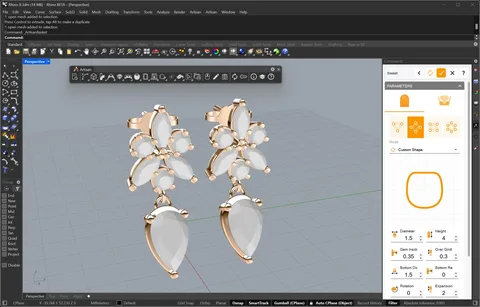
At its core, jewelry design software is a specialized digital suite that allows you to build, edit, and visualize jewelry in a virtual space. Instead of carving wax by hand, you use a mouse or a stylus to manipulate shapes.
Modern software allows you to:
-
Construct 3D Models: Build a digital version of a ring or necklace that can be viewed from every possible angle.
-
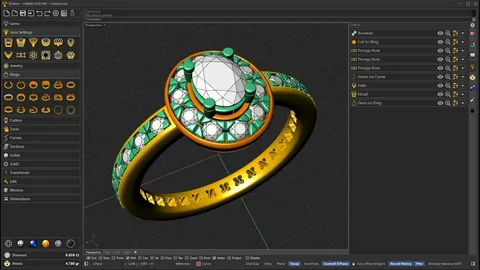
Apply Materials: Virtually “set” rubies, emeralds, or diamonds into bands made of platinum, rose gold, or silver.
-
Iterate Instantly: If a setting looks too high, you can lower it with a click rather than starting the entire project over.
The most transformative feature for a beginner is jewelry rendering. This process uses advanced algorithms to calculate how light hits metal and gemstones, producing a high-definition image that looks exactly like a real photograph.
Top Software Recommendations for 2026
The market is filled with powerful tools, but for a beginner, the learning curve is the most important factor. Here are the top contenders for those starting their journey this year.
1. Tinkercad: The Perfect Starting Block
Tinkercad remains the gold standard for absolute novices. It uses a simple drag-and-drop interface where you combine basic geometric shapes to create complex items.
-
Why it works: It is browser-based, meaning you don’t need a high-end computer to start. It teaches you the fundamentals of spatial awareness in 3D design without the clutter of professional menus.
2. SketchUp: Simple Yet Scalable
SketchUp is famous for its “Push/Pull” tool, which makes 3D modeling feel very intuitive.
-
Why it works: It offers a free web version and a massive library of pre-made shapes. It is an excellent middle ground for those who have outgrown Tinkercad but aren’t ready for industrial-grade software.
3. Blender: The Power of Open Source
Blender is a free, professional-grade tool that has a massive community following.
-
Why it works: While it has a steeper learning curve, the results are stunning. Blender’s rendering engine is world-class, allowing beginners to create hyper-realistic images of their jewelry for portfolios or social media without spending a dime on licensing.
4. Rhino & MatrixGold: The Professional Path
If you are serious about a career in the industry, Rhino (often paired with the jewelry-specific plugin MatrixGold) is the industry standard.
-
Why it works: It features specific “builders” for shanks, settings, and prongs. While more expensive and complex, it is the tool used by high-end jewelry houses globally.
The Importance of Jewelry Rendering
As a beginner, you might wonder why you should care about rendering if you just want to make the jewelry. Rendering is your best feedback tool. When you apply a jewelry rendering pass to your 3D model, you see the “sparkle” and the reflections.
It helps you catch errors, such as a prong that is too thin to hold a stone or a band that looks uncomfortable. In 2026, rendering has become so fast that many designers use “real-time rendering” to see changes as they make them. This instant gratification is a huge boost to a beginner’s confidence.
A Step-by-Step Path to Your First Design
If you are ready to start, follow this streamlined workflow to avoid feeling overwhelmed:
-
Select Your Tool: Start with Tinkercad or SketchUp to get the “feel” of 3D space.
-
Master the “Boolean” Operations: Learn how to join two shapes together or use one shape to “cut” a hole in another (essential for ring sizing).
-
Start with a Pendant: Pendants are easier than rings because they don’t require precise sizing for a finger. Create a simple heart or geometric shape.
-
Experiment with Settings: Try placing a simple sphere (representing a pearl or bead) onto your design.
-
Render and Review: Run a high-quality render. Does the metal look smooth? Does the stone look centered?
-
Export for 3D Printing: Most beginners in 2026 use 3D printing to turn their digital files into wax models for casting. Ensure you save your file as an .STL or .OBJ.
Common Pitfalls to Avoid
Every new designer makes mistakes, but you can save hours by keeping these in mind:
-
Ignoring Scale: It is easy to design a beautiful ring on a 27-inch monitor, only to realize it would be five inches wide in real life. Always check your millimeter measurements.
-
Overcomplicating the First Draft: Start with a simple band before trying to design a multi-stone engagement ring.
-
Skipping the Basics: Don’t move to advanced professional software until you understand the basic logic of 3D modeling.
The Future of Design: AI and 3D Printing
As we progress through 2026, the industry is seeing a massive surge in AI-assisted design. Some modern software can now suggest stone layouts or automatically generate a ring shank based on a few keywords. When combined with affordable 3D printing, the barrier between an idea and a wearable piece of art has virtually disappeared.
Final Thoughts
Jewelry design is no longer a “closed-door” industry reserved for those with years of bench training. With a laptop and a bit of patience, you can join the ranks of modern designers. Start small, practice your rendering skills, and don’t be afraid to experiment. The most beautiful piece of jewelry you’ll ever own is the one you design yourself.
Frequently Asked Questions
Do I need a powerful computer? For browser-based tools like Tinkercad, a standard laptop is fine. For Blender or Rhino, you will benefit from a dedicated graphics card.
Is jewelry design a viable career in 2026? Absolutely. The demand for custom, personalized jewelry is at an all-time high, and digital skills are the most sought-after asset in the industry.
Can I sell my digital designs? Yes. Many designers sell their 3D files (.STL) on marketplaces for other jewelers to print and cast, creating a passive income stream.