




A restaurant manager in a busy shopping plaza once described her weekly routine to me. Every Sunday night, she would climb a small ladder, plug a laptop into the back of a television, and manually swap out slides for the coming week’s specials. If a price changed midweek, the screen stayed wrong until the next scheduled update. Multiply that across five locations, and you get a manager who spends more time managing screens than managing her business.
This is the exact problem digital signage software was built to solve. Instead of physically updating displays one by one, business owners can now control every screen from a single dashboard, often without leaving their office chair. Yet many businesses still hesitate to switch, either because they assume the technology is complicated, expensive, or simply unnecessary for their size of operation. None of that has to be true, and understanding how modern digital signage solutions actually work often changes that assumption completely.
The Real Cost of Manual Screen Updates
Before diving into solutions, it helps to understand the problem clearly. Manual signage updates cost more than time. They cost consistency. A promotion that ends on Tuesday might still display on Thursday simply because nobody remembered to swap the file. A menu price change might get updated at one location but forgotten at another, creating confusion for customers and awkward conversations at the register.
These small inconsistencies add up. Customers notice outdated pricing. Staff waste time explaining discrepancies. And business owners lose the ability to react quickly to changing conditions, whether that means a flash sale, a weather related closure notice, or a last minute event announcement.
What Digital Signage Software Actually Does
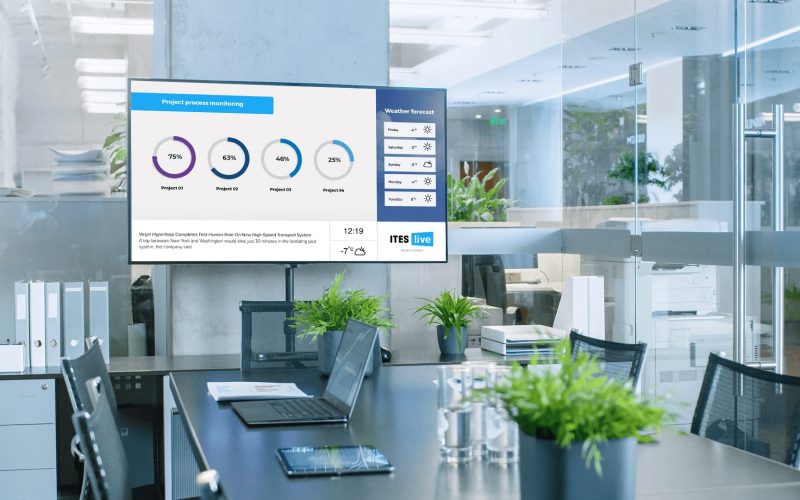
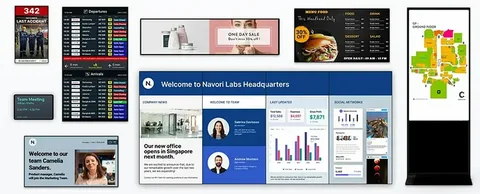
At its simplest, digital signage software allows you to manage what appears on your screens remotely, through a web based platform rather than a physical connection. You upload content once, schedule when and where it should appear, and the system handles the rest automatically across every connected display.
This might sound like a small convenience, but in practice it changes how businesses operate day to day. A retail chain can push a new promotion to fifty locations at once. A restaurant can update lunch specials from a phone during a morning commute. A gym can display class schedules that automatically adjust based on the day of the week, without anyone touching a single screen manually.
The shift is not just technical, it is operational. Businesses using proper digital signage solutions spend far less time on upkeep and far more time on the actual content strategy behind what their screens communicate.
Key Features That Separate Good Signage Software From the Rest
Not all platforms are built the same way, and understanding what to look for makes a real difference in daily usability.
Remote content management sits at the top of the list. The ability to update, schedule, and remove content from anywhere, without needing physical access to the screen, is the foundation of any useful digital signage software. Without this, you are simply back to manual updates with extra steps.
Multi screen and multi location control matters just as much for growing businesses. Whether you operate one lobby display or fifty locations across different cities, the platform should let you manage everything from a single account, with the option to customize content per location when needed.
Scheduling flexibility is another core requirement. Being able to set specific start and end times for promotions, or automatically rotate content based on time of day, removes the need for constant manual oversight. This is especially useful for businesses running different menus, offers, or announcements throughout a single day.
Reliability also deserves attention. A signage platform that frequently disconnects or fails to update screens on time creates more frustration than it solves. Dependable uptime and consistent performance should be non negotiable when evaluating any digital signage solutions provider.
Industries That Benefit Most From Digital Signage Solutions
Restaurants and cafes use digital signage software daily to update menus, highlight limited time offers, and adjust pricing without printing new boards every time something changes. This alone often pays for the software within the first few months of use.
Retail stores rely on it to promote in store sales, seasonal collections, and loyalty programs, often syncing screen content with broader marketing campaigns running elsewhere.
Medical offices and waiting rooms use signage to display appointment updates, health information, or general announcements, creating a more professional environment without staff needing to manage printed materials constantly.
Gyms, salons, and service based businesses use it for class schedules, service menus, and promotional content, often rotating messaging throughout the day based on customer traffic patterns.
Corporate offices increasingly use signage for internal communication as well, displaying company announcements, meeting room schedules, or performance metrics on screens placed throughout a building.
How EZ AD TV Approaches Digital Signage Software Differently
EZ AD TV was built around a simple observation. Most business owners do not want to become signage experts, they just want their screens to reflect what is actually happening in their business, without extra effort. Because of this, the platform focuses heavily on simplicity without sacrificing the features that growing businesses actually need.
Content updates can be made from any device with internet access, meaning a manager does not need to be physically present at a location to change what is displayed. Scheduling tools allow businesses to plan content weeks in advance, while still leaving room for last minute changes when something urgent comes up.
For businesses managing multiple locations, EZ AD TV allows centralized control while still supporting location specific customization, so a single company can maintain consistent branding while adjusting details like local pricing or store specific promotions.
Reliability remains a core focus as well, since a signage system is only useful if it consistently displays what it is supposed to, exactly when it is supposed to. This dependability is often what separates a genuinely helpful digital signage solution from one that simply looks good in a sales demo.
Common Questions Business Owners Ask Before Switching
Many business owners wonder if digital signage software requires expensive hardware to get started. In most modern setups, existing televisions or monitors can be used with a small connected device, meaning businesses rarely need to replace their current screens entirely.
Others ask whether the platform requires technical knowledge to operate daily. Well designed digital signage solutions are built for everyday users, not IT specialists, meaning most content updates take only a few minutes once someone becomes familiar with the dashboard.
A common concern also involves cost versus return. When compared against the ongoing expense of printed materials, static signage, or hours spent manually updating screens, most businesses find that digital signage software pays for itself relatively quickly through saved labor and improved customer communication.
Practical Tips for Getting the Most Out of Digital Signage
Plan content in categories rather than one off updates. Grouping promotions, menu items, and announcements into organized templates makes future updates faster and keeps branding consistent across screens.
Use scheduling features fully rather than manually swapping content in real time. Setting start and end dates in advance removes the risk of forgotten updates and keeps messaging accurate without daily supervision.
Review performance periodically. Many digital signage solutions offer basic insights into what content displays and when, helping business owners understand which promotions get the most exposure throughout the week.
Final Thoughts
The days of climbing ladders and manually swapping files just to update a single screen are fading quickly, and for good reason. Digital signage software gives business owners the ability to control messaging across every screen they manage, without the time drain that manual updates create.
With EZ AD TV, that control becomes simple rather than technical, allowing businesses of any size to keep their screens accurate, current, and aligned with what is actually happening day to day. Instead of screens becoming another task to manage, they finally become the tool they were always meant to be.