


When attackers get past your perimeter, their next target is always the same: wherever your data lives. That’s why more security teams now specify Air Gap Storage as a non-negotiable part of their resilience plan.
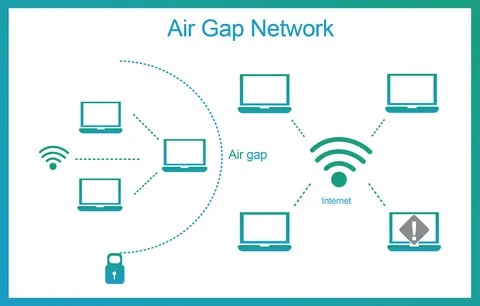
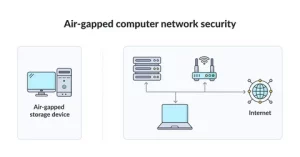
Air gap storage is a repository that is not continuously connected to your production network. It may be powered down, network-disabled, or behind one-way controls that only allow inbound writes during scheduled windows. The result is simple. If malware cannot reach it, malware cannot destroy it.
How Air Gap Storage Differs from Regular Backup Targets
A standard NAS or backup share is online 24/7. It uses the same Active Directory, the same VLAN, and often the same admin passwords as everything else. Attackers love that.
Air Gap Storage breaks those shared links in three ways.
1. Network Discontinuity
The storage has no persistent IP presence. During a backup window, it either powers on and connects, or a gateway opens a temporary path. When the job ends, the path is removed. Scans from infected hosts show nothing to attack.
2. Administrative Separation
Access to the storage requires different credentials, different MFA, and ideally a different identity system entirely. There is no domain trust, no SSO, and no password reuse. Stealing domain admin gets an attacker nowhere.
3. Write-Once Behavior
Once data is written, the storage controller enforces immutability for a defined retention period. Even if the device is reconnected by an insider, existing backups cannot be altered or purged.
Common Deployment Models
You can implement air gap storage without reinventing your whole infrastructure.
Model A: Power-Cycled Repository
A physical server with large disks sits in your rack powered off. A scheduled task powers it on via IPMI, the backup runs, and a post-job script shuts it down.
The window might be 45 minutes daily. The rest of the day, it’s electrically offline and invisible to the network.
Model B: Data Diode or One-Way Gateway
The storage lives behind a hardware device that only allows traffic in one direction. Your backup software can send data to it, but nothing on the storage side can initiate connections back.
This is common in government and energy sectors, and it works well for regulated data.
Model C: Vaulted Object Storage Cage
A private object cluster is installed in a locked half-rack with no uplink. A temporary Layer 2 bridge is established during replication, then torn down.
This gives you scale for unstructured data while preserving the gap. You get object semantics without constant exposure.
Performance and Recovery Expectations
Teams worry that isolation equals slow. In practice, the gap only affects the moment you need to reconnect.
Backup Speed: You schedule the window to match your ingest rate. If you need 10 TB nightly and your link does 5 TB/hour, plan a 2-hour window.
Restore Speed: Once reconnected, Air Gap Storage performs like any other disk or object target. Many platforms support instant VM boot directly from the repository, so you can be back online in under an hour for tier-1 systems.
RPO Impact: Because the storage isn’t always available, real-time replication isn’t possible. Most orgs accept an RPO of 24 hours for the gapped copy and keep a shorter RPO on a hot, non-gapped tier.
Operational Rules That Make It Work
- Automate the Disconnect: Don’t rely on a human to unplug a cable. Use scripts, relays, or gateway APIs to ensure the path closes every time.
- Log Everything: Power-on, connect, backup start, backup end, disconnect, power-off. Send logs to a SIEM that is not on the same domain.
- Test Restores Monthly: Restore a different workload each month from the air-gapped copy. Track the time and document issues.
- Protect the Keys: If your backups are encrypted, the keys must not live on production. Use an HSM or a separate key manager that the vault can reach during its window.
Budget Planning: Capex vs. Opex
Air gap storage can be capital or operational depending on model.
Capex Example: Buy a 200 TB hardened server for $12,000. Depreciate over 5 years. Low ongoing cost.
Opex Example: Lease a managed vault cage in a separate data center. Pay monthly per TB and for remote hands to connect drives.
Most mid-size firms spend 6 to 10 percent of their total data protection budget on the air gap layer. When you compare that to the cost of 14 days of downtime, the ROI is obvious.
Integration With Your Existing Backup Software
You don’t need to rip and replace. Most enterprise backup tools support secondary targets, post-job scripts, and rotated repositories.
Point your existing jobs to a local cache for fast RTO, then create a second copy to Air Gap Storage on a schedule. Use different service accounts for each target. That alone eliminates a huge class of attacks.
Myths That Cause Bad Decisions
Myth 1: “If it’s in another building, it’s air gapped.”
Location doesn’t matter if it’s always online and uses the same credentials. Attackers don’t care about distance.
Myth 2: “We have snapshots, so we’re covered.”
Snapshots on the primary array are deleted with the same storage admin rights used to manage the array. They’re fast, but not isolated.
Myth 3: “Air gap is only for banks and defense.”
Ransomware is automated. Small manufacturers and clinics get hit daily. If your business stops when data is gone, you need isolation.
Conclusion
The goal of modern data protection isn’t just to have backups. It’s to have backups that survive the attack. Network segmentation, immutable storage, and credential isolation all help, but only a true disconnect guarantees that an adversary cannot reach your last clean copy.
Start with your most critical 20 percent of data. Prove you can restore it from isolation. Then expand. When leadership asks for your ransomware plan, “isolated storage with tested restores” is the answer that ends the risk discussion.
FAQs
1. Can air gap storage be virtual instead of physical?
Yes, if the virtual environment is completely separate. It needs its own hypervisor, storage, networking, and identity with no trust to production. Many orgs put the virtual vault in a separate management cluster that is powered down except during backup windows.
2. How do I handle monitoring without creating a backdoor?
Use push-based monitoring. The vault sends logs and health data outbound during its connection window to a SIEM. Never allow inbound monitoring connections from production. If you need up/down status, use a power sensor on the PDU that reports to an isolated system.
3. What retention policy works best with air gap storage?
A common approach is 7 daily backups on hot storage, 4 weekly and 12 monthly on air gap storage, and yearly kept for 7 years. Adjust based on compliance. The key is that anything older than 2 weeks should live in the gap.
4. Does encryption slow down restore from an air gap?
Slightly, but modern CPUs handle it easily. The bigger factor is read throughput of the storage and network. Test a full restore during deployment so you know your real RTO. Encryption is mandatory, so plan for it.
5. How do we prevent accidental deletion during maintenance?
Enable retention lock at the storage level so even admins cannot delete early. Require two-person approval to change retention policies. And keep the management interface on a separate network that is only accessible via crash cart or a PAM session with recording.