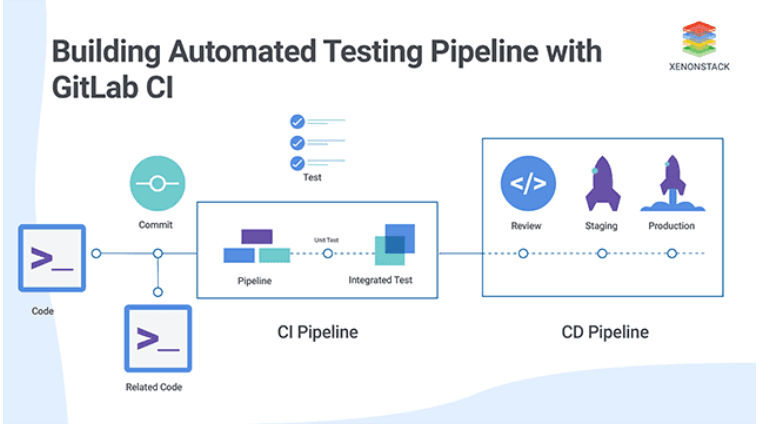
The software development lifecycle (SDLC) has evolved significantly over the years, largely due to the rise of Quality Assurance (QA) Automation. Automated testing tools now play a crucial role in ensuring that applications are reliable, functional, and performant before they hit the market. In today’s fast-paced development environments—especially with Agile and DevOps practices—QA Automation has shifted from being a mere option to an absolute necessity.
What is QA Automation?
Quality Assurance (QA) Automation refers to the use of specialized software tools to automatically execute test cases, compare actual results with expected outcomes, and generate detailed, easy-to-understand test reports. It’s a streamlined method that allows developers and testers to ensure that their software is bug-free, functional, and ready for deployment.

How QA Automation Works
In traditional manual testing, testers would have to execute the same test cases repeatedly. This process could be time-consuming and prone to human error. With QA Automation, however, repetitive tests can be run in a fraction of the time. Automated tests are highly scalable, and they fit perfectly into Continuous Integration (CI) and Continuous Deployment (CD) workflows, making it easier to deliver updates and fixes on a regular basis.
The Benefits of QA Automation
QA Automation offers a wide range of advantages to both small startups and large enterprises. It significantly boosts efficiency, cuts down on errors, and helps teams focus on more critical tasks. Below are some key benefits that highlight the value of integrating automation into your QA process:
1. Speed and Efficiency
Automated testing is far quicker than manual testing. What could take hours or even days manually can be done in a matter of minutes with automation. This not only saves time but also allows for more frequent testing, which speeds up the release cycle and improves time-to-market.
2. Cost Efficiency Over Time
While the upfront cost of setting up automated testing may seem high, it quickly pays off in the long run. Automated tests are reusable, meaning they can be executed repeatedly across various software versions without incurring additional costs. Over time, this reduces the per-release cost of testing, making it a more economical solution for growing businesses.
3. Accuracy and Reliability
Automated tests remove human error from the equation. Once properly set up, automated testing tools provide consistent results every time they run. This reduces the chances of overlooking bugs or mistakes that can arise from manual testing.
4. Increased Test Coverage
Automation enables you to run a large number of test cases simultaneously. This broadens test coverage, ensuring that all parts of the application are thoroughly checked. With automation, you can test more scenarios in less time and ensure that your software works under various conditions.
5. Continuous Testing in Agile & DevOps
In Agile and DevOps environments, quality assurance needs to be a continuous process. QA Automation integrates seamlessly into these workflows, allowing teams to get real-time feedback about the quality of their software. This enables faster releases and continuous delivery without compromising on quality.
Key Components of QA Automation
QA Automation is made up of several key components, each playing a vital role in the overall testing process:
1. Test Automation Tools
These tools help automate the creation, management, and execution of tests. Popular examples include:
- Selenium: An open-source tool for automating web application testing across browsers.
- Appium: A tool used for mobile app testing on both Android and iOS devices.
- JUnit: A framework used for unit testing in Java applications.
- Keploy: An AI-driven tool that generates unit tests automatically.
2. Test Scripts
Test scripts are the instructions used to perform automated tests. Written in programming languages like Java, Python, or JavaScript, these scripts tell the testing tool exactly what to do, ensuring the application behaves as expected.
3. Test Data
Test data refers to the input, expected output, and environmental conditions used in the test. Managing test data effectively ensures that tests are consistent and repeatable.
4. Test Environment
The test environment mirrors the production environment, ensuring that tests are accurate. This includes software, hardware, and network configurations necessary for simulating real-world conditions during testing.
Types of QA Automation Testing
QA Automation includes several types of testing, each addressing specific aspects of an application’s functionality:
- Unit Testing: Focuses on testing individual components or functions of an application in isolation.
- Integration Testing: Verifies that different parts of the application interact correctly.
- Functional Testing: Ensures that the application performs according to its business and user requirements.
- Regression Testing: Tests existing features after updates or changes to confirm they still work as intended.
- Performance Testing: Evaluates the speed, scalability, and stability of the application under different user loads.
Best Practices for QA Automation
To ensure that your QA Automation efforts are effective and efficient, follow these best practices:
1. Start Small, Scale Gradually
It’s best to start with high-ROI test cases that are easy to automate. Once these are set up, you can expand your automation efforts.
2. Choose the Right Tools
Selecting the right tools is critical for success. The tools you choose should align with your project’s technology stack, environment, and goals.
3. Keep Test Scripts Updated
As the application evolves, so should your test scripts. Regularly update them to account for changes in the application to avoid false positives and ensure accurate results.
4. Integrate with CI/CD
5. Measure and Refine
Constantly assess the effectiveness of your tests. Eliminate redundant tests and optimize those that run too slowly.
Popular QA Automation Tools
Some of the most widely used tools for QA Automation include:
- Selenium: A free, open-source tool for automating web browsers.
- Keploy: An AI-powered testing tool that helps generate unit tests, saving time and manual effort.
- Appium: An automation framework for mobile apps, supporting both Android and iOS.
- Jenkins: A tool for automating parts of software development related to building, testing, and deploying.
Challenges of QA Automation
While QA Automation offers numerous benefits, it’s not without challenges:
1. Initial Investment
The cost of setting up automated testing tools, infrastructure, and frameworks can be high. However, the return on investment becomes clear as testing becomes more efficient.
2. Skill Requirements
Automating complex tests requires skilled engineers who can write and maintain test scripts. As applications grow more sophisticated, keeping these scripts up-to-date can be resource-intensive.
The Future of QA Automation
As technology advances, the role of artificial intelligence (AI) and machine learning (ML) in QA Automation will become even more significant. Tools like Keploy, which leverage AI to generate test scripts automatically, are already reducing the manual effort involved. Furthermore, the growing use of DevOps and continuous integration/deployment (CI/CD) practices ensures that QA Automation will only become more integral to software development in the future.
Conclusion
QA Automation is a crucial aspect of modern software development. By integrating automated testing into your CI/CD pipeline, you can achieve faster release cycles, higher-quality software, and improved collaboration within your development team. Embracing the right tools, practices, and methodologies will enable organizations to remain competitive and deliver high-quality software at scale.
QA Automation is here to stay, and its role in shaping the future of software development will only continue to grow.