

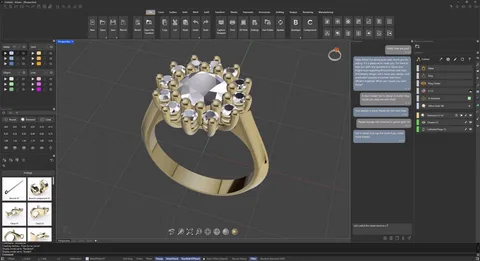
Jewelry design has always been a blend of art, precision, and passion. Traditionally, a designer’s journey began with a sketchbook and a pencil, a process that demanded immense time and manual dexterity. However, as we move through 2026, technology has completely democratized this craft. Today, jewelry design software allows anyone—from hobbyists to aspiring professionals—to translate their imagination into stunning, wearable art with unprecedented ease.
Whether you dream of crafting delicate engagement rings or bold, geometric necklaces, digital tools provide the most efficient path to success. This guide explores the essential software, the power of rendering, and the step-by-step process to launch your design career this year.
What Exactly is Jewelry Design Software?
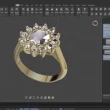
At its core, jewelry design software is a digital workspace that utilizes Computer-Aided Design (CAD) technology. Instead of carving wax by hand, you use a mouse or a stylus to build a 3D model on your screen. These tools allow you to:
-
Build Complex Geometries: Create intricate filigree or perfect symmetry that would be nearly impossible to achieve by hand.
-
Simulate Materials: Instantly swap a polished 18K gold band for brushed platinum or rose gold.
-
Set Gemstones: Access digital libraries to “drop” perfectly calibrated diamonds, sapphires, or emeralds into your settings.
-
Precision Engineering: Ensure that stones fit perfectly and that the weight of the piece is balanced for comfort.
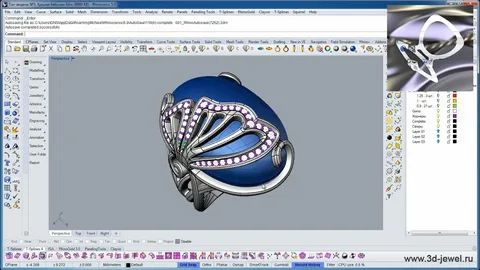
Why Beginners are Flocking to Digital Tools
In 2026, the barrier to entry for jewelry design has never been lower. Beginners are increasingly bypassing traditional methods for digital workflows for several key reasons:
-
Non-Destructive Editing: If you don’t like a specific prong style, you simply “undo” or modify the parameters. You never waste expensive raw materials during the prototyping phase.
-
Instant Scaling: You can design a ring in a size 7 and instantly scale the entire 3D model to a size 5 or 9 without redrawing a single line.
-
The “Pro” Look: Even a novice can produce a high-quality jewelry rendering that looks like a professional photograph. This allows you to market your designs or get client approval before you even spend a cent on manufacturing.
Essential Features to Prioritize
When you begin your search for the right tool, prioritize these four pillars of functionality:
-
Parametric Modeling: This allows you to change one dimension (like a stone’s diameter) and have the rest of the ring automatically adjust to fit.
-
High-Fidelity Rendering Engines: Look for software that simulates how light reflects off metal and refracts through facets.
-
3D Print Compatibility: Your software must export files (usually .STL or .OBJ) that are compatible with 3D resin printers, which are now the standard for creating casting patterns.
-
Intuitive User Interface (UI): For a beginner, a cluttered screen is the enemy of creativity. Choose a tool that hides advanced features until you actually need them.
Top Jewelry Design Software for 2026 Beginners
The market offers a range of tools, from free web-based apps to high-end professional suites. Here are the top recommendations for those starting their journey this year:
1. Tinkercad (The Entry Point)
Tinkercad remains the undisputed king for absolute novices. It is a free, browser-based tool that uses a simple “drag and drop” system of basic shapes. While you won’t design a complex pavé diamond necklace here, it is the perfect place to learn the basics of 3D space and proportions.
2. SketchUp (The Versatile Choice)
SketchUp is famous for its “Push/Pull” interface, making 3D modeling feel very tactile. It offers a massive 3D Warehouse where you can find pre-made components, helping beginners see how a final piece is constructed.
3. RhinoGold / MatrixGold (The Industry Standards)
If you are serious about a career, these tools are built by jewelers for jewelers. They include specialized wizards for creating ring shanks, head settings, and stone layouts. While they have a steeper learning curve, they are the most powerful tools for professional-grade accuracy.
4. Blender (The Creative Powerhouse)
Blender is free, open-source, and incredibly powerful. In 2026, its Cycles rendering engine is capable of producing world-class imagery. While it is a general 3D tool, many jewelry-specific “add-ons” make it a favorite for designers who want total creative freedom without a subscription fee.
The Magic of Jewelry Rendering
One of the most exciting aspects of modern design is jewelry rendering. This is the process where the computer calculates light, shadows, and reflections to create a photorealistic image.
In 2026, rendering is no longer just for show. It serves a vital functional purpose:
-
Lighting and Reflection Check: You can see how a diamond will “sparkle” or if a metal’s polish creates unwanted glares.
-
Customer Pre-Sales: You can show a client exactly what their custom piece will look like, increasing trust and closing sales faster.
-
Marketing: High-quality renders are essential for Instagram, TikTok, and e-commerce platforms.
Step-by-Step: Your First Digital Design
-
Define Your Concept: Sketch a rough idea on paper first to establish the “vibe.”
-
Block the Basics: Use your software to create the main “body” of the piece (like the ring band).
-
Refine the Geometry: Add the fine details, like filigree, engraving, or prongs.
-
Assign Materials: Tell the software which parts are 14K gold and which parts are gemstones.
-
Render the Image: Set up your digital “camera” and lighting to produce a stunning final photo.
-
Prototype: Export your file to a 3D printer to see the physical scale before moving to final metal casting.
The 2026 Career Outlook
The jewelry industry is evolving. We are seeing a massive rise in AI-assisted design, where algorithms suggest patterns or stone layouts based on your initial input. Furthermore, 3D printing has made small-batch production affordable for independent creators.
If you possess creativity, an eye for detail, and basic software skills, there has never been a better time to enter the market. The frontier of jewelry is no longer just in a physical workshop—it is on your screen.