



Keeping your antivirus software up to date is essential for protecting your devices against evolving cyber threats. Avast is one of the most popular antivirus solutions worldwide, offering robust security features such as real-time threat detection, ransomware protection, firewall controls, and privacy tools. However, to continue enjoying these benefits without interruption, you need to renew your Avast subscription, license, or antivirus plan before it expires.
This comprehensive guide explains everything you need to know about renewing your Avast subscription—whether you’re using a PC, Mac, Android, or iOS device—and outlines common renewal methods, troubleshooting tips, and best practices to ensure continuous protection.
Why Renewing Your Avast Subscription Is Important
When your Avast subscription expires, your device may lose access to premium features like advanced malware protection, automatic updates, phishing prevention, and secure browsing tools. While Avast may continue to offer limited protection in free mode, it does not provide the same level of security as a paid plan.
Renewing your Avast antivirus plan ensures:
- Continuous protection against viruses, spyware, ransomware, and zero-day threats
- Automatic updates to the latest virus definitions
- Access to premium features such as VPN, firewall, and data breach monitoring
- Peace of mind knowing your personal and financial data is secure
Different Ways to Renew Your Avast Subscription
Avast provides several convenient options for renewing your license or antivirus plan. You can select the approach that aligns most with your preferences
1. Renewing Avast Subscription Online (Recommended)
The easiest and most common way to renew your Avast subscription is through your Avast Account.
Steps to renew online:
- Open your web browser and sign in to your Avast Account.
- Go to the Subscriptions or My Products section.
- Locate the product that is about to expire.
- Click Renew or Upgrade.
- Select your preferred plan duration (1 year, 2 years, etc.).
-
Finalize the payment procedure by utilizing a credit card, debit card, or other approved payment options.
Once payment is confirmed, your subscription is automatically extended, and your device remains protected without needing to reinstall the software.
2. Renewing Avast License Using the Avast Application
You can also renew your subscription directly from the Avast antivirus software installed on your device.
Steps:
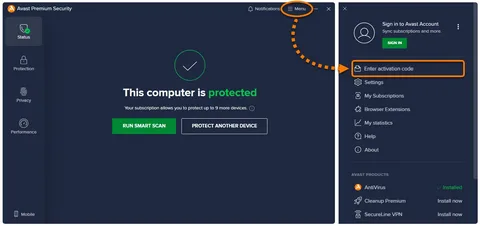
- Open the Avast antivirus program on your computer.
- Click on Menu or My Subscriptions.
- Check the subscription status and expiration date.
- Select Renew Now.
- Follow the on-screen instructions to complete payment.
This method is ideal if you receive an expiration warning notification from Avast and want to act immediately.
3. Renewing with a New Activation Code
If you purchased a new Avast license or renewal code from a retailer or online store, you can activate it manually.
How to activate a new license:
- Open Avast antivirus on your device.
- Navigate to Menu > Enter Activation Code.
- Enter the new activation code exactly as provided.
- Click Activate.
Your subscription will be updated instantly, and the new expiration date will reflect the renewed plan.
4. Automatic Renewal Option
Avast offers an auto-renewal feature that automatically extends your subscription before it expires. This option prevents lapses in protection and saves time.
Benefits of auto-renewal:
- No need to remember renewal dates
- Continuous protection without interruption
- Instant access to the latest features
You can enable or disable auto-renewal anytime from your Avast Account settings.
Troubleshooting Common Renewal Issues
Sometimes users encounter issues during the renewal process. Here are some common problems and solutions:
- Payment Declined:
Ensure your payment details are correct and that your bank allows online transactions. - Subscription Not Updated After Payment:
Log out and log back into your Avast Account or restart the Avast application. - Wrong Product Activated:
Make sure the license you purchased matches the product installed on your device. - Expired License Still Showing:
Check that you activated the new license on the correct Avast account. - If issues persist, you can contact Avast support or seek assistance through customer service. For immediate help with renewal-related concerns, some users prefer speaking directly with a support representative.
Renewing Avast on Multiple Devices
Many Avast plans support multiple devices under a single subscription. When you renew, the updated license applies to all connected devices as long as they’re linked to the same Avast Account.
Tip: Always sign in with the same Avast Account on each device to avoid license synchronization issues.
Tips to Get the Best Avast Renewal Deal
- Renew before expiration to avoid service disruption
- Look for discounts during promotional periods
- Choose multi-year plans for better long-term savings
- Bundle services (like Avast Ultimate) for comprehensive protection
Being proactive with renewal not only saves money but also ensures uninterrupted cybersecurity.
When to Seek Help with Avast Renewal
If you’re unsure which plan suits your needs, facing technical issues, or want assistance completing the renewal process, professional help can save time. Users who prefer guided support may reach out via trusted support channels or call for renewal-related assistance.
Final Thoughts
Renewing your Avast subscription, license, or antivirus plan is a crucial step in maintaining strong digital security. With multiple renewal options available—online, in-app, activation codes, or auto-renewal—Avast makes it easy to stay protected. By renewing on time and ensuring your license is correctly activated, you safeguard your devices against the ever-growing landscape of cyber threats.
Staying vigilant, keeping your software updated, and renewing your antivirus plan promptly ensures that Avast continues to work effectively in protecting what matters most: your data, privacy, and peace of mind.