




Before any software reaches users, it must pass a critical checkpoint. This checkpoint is called User Acceptance Testing (UAT). At this stage, real users evaluate the software to confirm that it meets business goals and user expectations. In other words, UAT ensures the product works not only from a technical perspective but also in real-life workflows.
Today, many software projects struggle because they fail to satisfy actual user needs. In fact, research shows that nearly 70% of software projects fail due to poor alignment with user expectations rather than coding mistakes. Therefore, UAT plays a crucial role in preventing such failures.
In this guide, you will understand the UAT meaning, its importance, how the process works, and how teams can perform it effectively. You will also learn how modern tools help streamline testing and improve results.
What Does UAT Mean?
User Acceptance Testing (UAT) represents the final stage of the software testing lifecycle. During this phase, real users verify whether the system fulfills business requirements.
Earlier testing stages focus mainly on technical accuracy. For example, unit testing checks individual components of code. Similarly, integration testing verifies how different modules interact. However, UAT takes a different approach.
Instead of focusing on code, UAT concentrates on business validation. It answers a simple yet critical question:
Does the product perform as users expect in real-world situations?
If the answer is yes, the product moves closer to release. If not, teams must address the issues before deployment.
Why User Acceptance Testing Is Important
Even perfectly written software can fail if it does not solve the right problems. For this reason, UAT helps teams confirm that the product aligns with business expectations.
1. Prevent Expensive Post-Release Fixes
Fixing issues after release can be extremely costly. However, UAT helps teams identify problems earlier. As a result, organizations save time and resources.
2. Ensure Alignment With Business Goals
UAT creates a strong connection between developers and stakeholders. Because of this collaboration, both sides understand whether the software supports the intended objectives.
3. Increase User Confidence
When end-users participate in testing, they gain confidence in the product. Consequently, the transition to production becomes smoother.
4. Reduce Support and Maintenance Problems
Products validated through UAT usually generate fewer complaints after launch. Therefore, support teams spend less time resolving issues.
Additionally, many teams rely on structured documentation during UAT. A traceability matrix, for example, helps track every requirement and confirm that testers evaluate each one.
The Purpose of UAT
The main objective of UAT is simple. It confirms that the software delivers value in real business environments.
More specifically, UAT verifies that the system:
- Meets user and business requirements
- Performs correctly in real-world workflows
- Provides a smooth and intuitive user experience
Unlike technical tests that focus on logic, UAT focuses on usability and practical performance.
Who Performs UAT?
Unlike traditional testing performed by QA engineers, UAT involves people who represent real business needs.
Common UAT participants include:
- End-users
- Business analysts
- Product owners
- Client representatives
These stakeholders evaluate the system from a business perspective rather than a coding perspective. Their feedback determines whether the product is ready for release.
When Is UAT Performed?
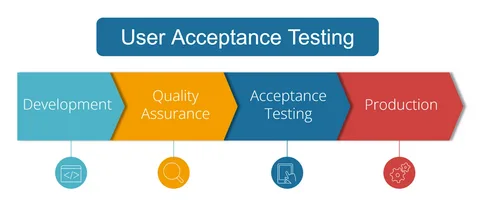
UAT takes place near the end of the testing lifecycle. Typically, it begins after several other testing stages finish successfully.
The sequence usually looks like this:
- Unit Testing
- Integration Testing
- System Testing
- User Acceptance Testing (UAT)
Because it occurs at the final stage, UAT acts as the last validation step before production deployment.
Types of User Acceptance Testing
Different organizations use various types of UAT depending on their goals. Some of the most common types include:
Alpha Testing
Internal teams perform alpha testing within the organization. Employees simulate user behavior and identify usability issues.
Beta Testing
External users perform beta testing. They test the product in real environments and provide valuable feedback.
Contract Acceptance Testing
This type verifies whether the product meets contractual obligations between vendors and clients.
Operational Acceptance Testing
Operational testing checks system readiness. For example, it verifies backup systems, recovery processes, and security measures.
Compliance Testing
Compliance testing ensures that the system meets legal and regulatory standards.
Each type supports a different aspect of validation, but together they strengthen the overall testing process.
The UAT Process and Planning
A well-structured UAT process helps teams achieve reliable results. Therefore, organizations typically follow a clear testing plan.
A typical UAT workflow includes the following steps:
- Define business requirements
- Create detailed UAT test plans
- Select appropriate testers
- Design real-world test scenarios
- Execute the tests
- Record feedback and results
Modern development teams often combine manual testing with automation. For example, automation tools help run regression tests whenever teams introduce new changes after UAT feedback.
This approach helps maintain stability throughout the development cycle.
How to Perform Effective UAT Testing
To achieve meaningful results, teams should follow practical testing strategies.
1. Use Real-World Scenarios
Testing should reflect actual workflows. Artificial scenarios often miss critical problems.
2. Explain the Purpose of Each Feature
Testers must understand why features exist. This knowledge helps them evaluate whether the feature truly supports business goals.
3. Use Record-and-Replay Tools
Some tools capture user sessions and replay them during testing. This approach helps teams repeat real workflows consistently.
4. Document Everything
Proper documentation remains essential. It records feedback, identifies issues, and helps teams improve future testing cycles.
Common Challenges in UAT
Despite its benefits, UAT sometimes faces several challenges.
Common problems include:
- Limited availability of real users
- Unclear business requirements
- Poor time planning
- Weak communication between teams
However, structured planning and clear documentation reduce most of these issues.
Mistakes to Avoid During UAT
Some teams misunderstand the purpose of UAT. As a result, they make mistakes that reduce its effectiveness.
Common mistakes include:
- Treating UAT like technical QA testing
- Rushing through the testing phase
- Failing to document feedback
- Excluding real users from the process
Remember, UAT focuses on business validation rather than technical debugging.
UAT Best Practices
To maximize the value of UAT, teams should follow several best practices.
- Involve users early in the process
- Keep test scenarios simple and realistic
- Maintain strong communication between teams
- Allocate enough time for testing
- Use automation for repetitive validation tasks
These practices help teams identify issues early and improve product quality.
The Role of Automation in Modern UAT
Traditionally, teams perform UAT manually. However, automation now supports several aspects of the process.
For example, modern tools allow teams to:
- Record real user sessions
- Generate test scenarios automatically
- Run regression testing after updates
- Revalidate workflows after each release
Automation does not replace human validation. Instead, it strengthens the testing process by improving speed and consistency.
Conclusion
User Acceptance Testing plays a vital role in software development. It represents the final verification step before a product goes live.
While earlier testing phases confirm technical accuracy, UAT ensures the software meets real business needs. Without this stage, even perfectly coded systems can fail after release.
However, when teams plan UAT carefully and involve stakeholders, they gain valuable insights into usability and workflow performance.
By combining strong documentation, collaboration, and modern automation tools, organizations can turn UAT into their most powerful safeguard against costly production failures.
Frequently Asked Questions
What does UAT mean?
UAT stands for User Acceptance Testing, the final validation stage before software release.
Who performs UAT?
End-users, business analysts, product owners, and client representatives typically conduct UAT.
Can UAT be automated?
Certain parts can be automated, such as regression testing. However, human validation remains essential.
What happens if UAT fails?
The product cannot move to production. Developers must fix the issues and repeat testing.
How does UAT differ from QA testing?
QA testing focuses on technical correctness, while UAT verifies business value and user satisfaction.