




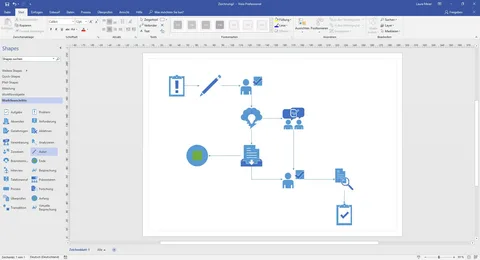
In the fast-paced business landscape of 2026, clarity has emerged as one of the most valuable assets for companies striving to stay competitive. Whether you’re mapping out complex software architectures, redesigning supply chains, or coordinating internal processes, visual diagrams often communicate better than written words. While many users may be familiar with the basic version of Visio included in Microsoft 365 plans, opting for Visio Plan 1 (Annual) offers professionals an array of high-tier features that enhance productivity. Let’s delve into why committing to this annual plan is a smart move for your toolkit.
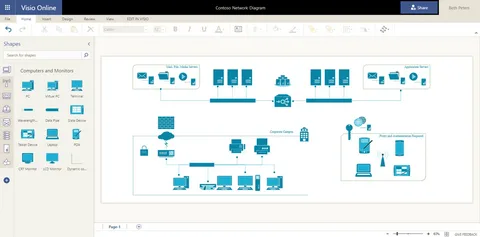
1. What is Visio Plan 1? (The Cloud-First Advantage)
Visio Plan 1 is a web-based diagramming solution that exists entirely in your browser. Unlike traditional “box software,” Plan 1 is designed for the modern, mobile workforce.
No Installation Required
With Visio Plan 1, you can start diagramming on any device, be it a Windows PC, a Mac, or even an iPad. The only requirements are an internet connection and a web browser. This flexibility turns any location into your drafting table.
Always Up-to-Date
One of the major advantages of an annual Plan 1 subscription is that you won’t be stuck using outdated software. Microsoft pushes feature and security updates directly to the web app, ensuring you always work with the latest industry-standard shapes and functionalities.
2. The Power of “Professional” vs. “Basic”
Organizations often question why they should invest in Plan 1 when a lightweight Visio web app is included in M365 Business Standard or Enterprise licenses. The answer lies in the expansive Stencil Library and feature set that Plan 1 offers.
What Plan 1 Unlocks for You
- Expanded Template Library: Access professional stencils for Detailed Network Diagrams, Azure & AWS Cloud Architecture, and UML 2.5 (Unified Modeling Language).
- Shape Data: Plan 1 allows you to add metadata to your shapes. For instance, in a network diagram, a server shape can store information about its IP address, OS version, and maintenance schedule.
- Advanced Flowcharts: Create complex flowcharts essential for Six Sigma and Lean process management—capabilities that are absent in the free version included in M365.
3. Collaboration in the Era of Remote Work
In 2026, collaboration is paramount, and Visio Plan 1 is built on the robust infrastructure of OneDrive for Business, providing 2GB of dedicated storage for seamless teamwork.
Real-Time Co-authoring
Multiple team members can work on the same diagram simultaneously, enjoying real-time presence indicators and instant updates—features reminiscent of collaborative environments in Word or Excel.
Microsoft Teams Integration
Share, view, and edit Visio files directly within Microsoft Teams, eliminating the need for downloading and re-uploading files. With everything residing in the cloud, your team has a “single source of truth.”
Stakeholder Feedback
You can share diagrams via secure links, allowing stakeholders to add comments or “pins” to specific parts of the drawing, facilitating precise feedback without requiring their own Visio licenses.
4. The Bridge to Data: Power BI Integration
One of the most powerful yet underutilized features of Visio Plan 1 is its integration with Power BI.
Unified Perspectives
You can embed Visio diagrams directly into Power BI reports, enhancing your data visualization capabilities.
Dynamic Insights
Imagine a warehouse floor plan where aisles change color based on real-time inventory levels tracked in Power BI. With Visio Plan 1, you can transform static drawings into living data reports.
5. Why the “Annual” Plan Wins Every Time
In a world plagued by “subscription fatigue,” you might wonder why committing to an annual plan is worthwhile.
Cost Savings
Typically, the annual commitment saves you approximately 15% to 20% compared to a monthly billing cycle.
Strategic Budgeting
For Project Management Offices (PMOs) and IT departments, a single annual fee (around $60/year or ₹4,140/year plus tax in 2026) is far easier to manage than fluctuating monthly costs.
Process Stability
Diagrams often serve as long-term assets. An annual plan ensures continuous access to vital process maps, unaffected by missed monthly payments or credit card expirations.
6. Use Cases: Who is Visio Plan 1 For?
Visio Plan 1 isn’t just for one type of professional—it serves various roles efficiently:
- IT Analysts: Ideal for mapping server racks and Active Directory structures.
- Business Analysts: Perfect for documenting Standard Operating Procedures (SOPs) using BPMN 2.0 or simple flowcharts.
- HR Professionals: Create dynamic organizational charts ready for company-wide sharing.
- Project Managers: Develop clearer project timelines and dependency maps that surpass traditional spreadsheet views.
7. Conclusion: Simplify the Complex
Opting for the “Annual” approach to Visio Plan 1 isn’t merely a financial decision; it’s a strategic commitment to organizational clarity. Providing your team with tools to visualize their thoughts leads to fewer errors, streamlined onboarding processes, and ensures that every stakeholder is aligned on the path forward.
Pro-Tip: 30-Day Free Trial
If you’re a first-time user, consider taking advantage of a 30-day free trial of Plan 1 to experience the benefits firsthand before the annual billing cycle begins.
How to Get Started
Getting started with Visio Plan 1 is easy:
- Allocate the License: Manage it via the Microsoft 365 Admin Center.
- Access the Web: Simply go to visio.office.com.
- Pick a Template: Use “Starter Diagrams” to save time on layout.
By committing to Visio Online Plan 1, you empower your team to achieve greater productivity and clarity in all their projects.